
Admin Module
Overview of the system - SchedulerDesk is a web-based booking application designed to help businesses manage appointments and reservations efficiently. It caters to various industries, including beauty salons, medical organizations, sports clubs, educational institutions, and more.
Benefit
Why Admin Modules is Important Part ?
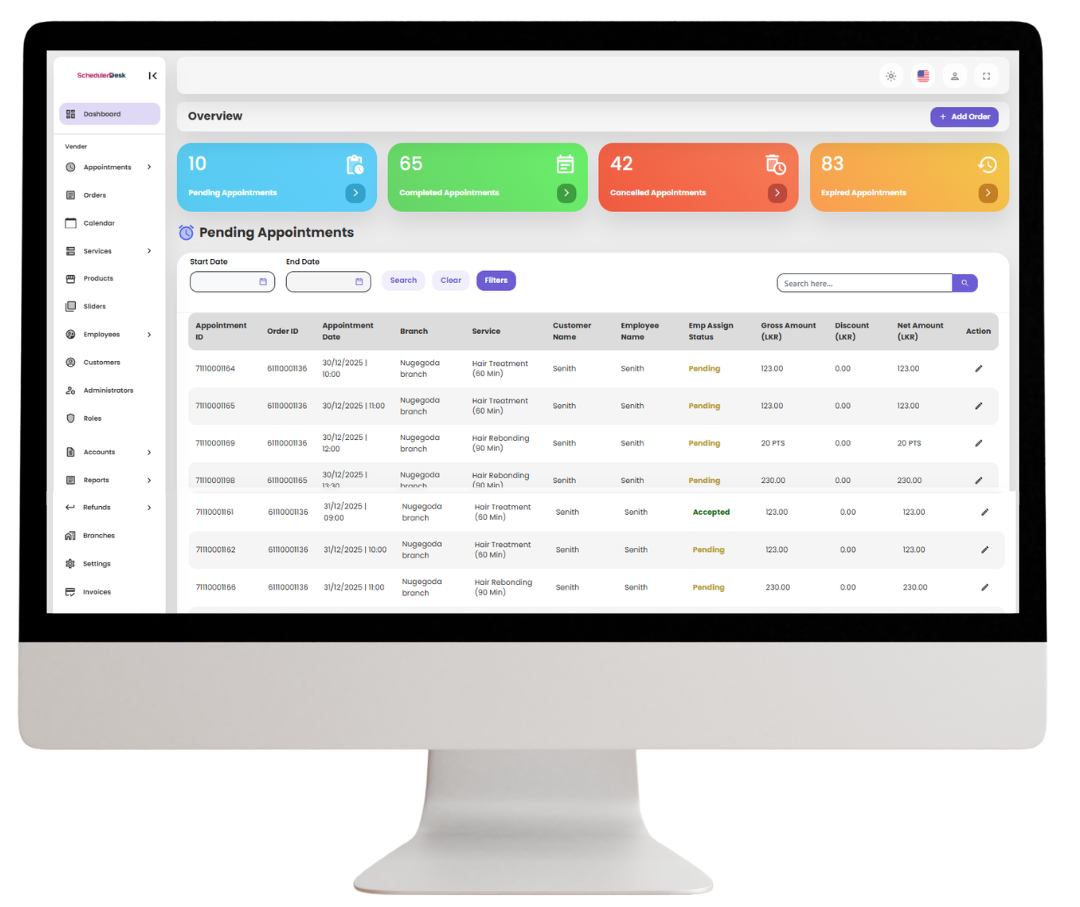
SchedulerDesk features a powerful dashboard that gives a clear, real-time view of salon appointments, staff availability, and business performance—helping salons manage bookings efficiently, reduce errors, and deliver better customer service from one central place.
Better Time Management
Shows all upcoming appointments in advance, helping staff prepare schedules, avoid overlaps, and manage peak hours smoothly.
Enables timely follow-ups and reminders, minimizing missed appointments and improving daily workflow.
Improved Customer Service
Gives quick access to client and service details, allowing personalized, well-prepared service for every customer.
Feature Capabilities
Manage Your Appointments, Just a Few Easy Steps
With SchedulerDesk, booking, updating, and tracking appointments is simple and fast—helping you save time, stay organized, and focus on delivering great service.
Appointments Management
Easily schedule, update, and track all salon appointments in real time.
Orders Management
Manage service orders, add-ons, and order statuses from a single place.
Services Management
Create, update, and organize salon services with pricing and duration.
Employee Management
Assign staff, manage schedules, and monitor employee performance.
Customer & Admin Management
Manage customer profiles, access levels, and admin controls securely.
Accounts & Finance Management
Track payments, expenses, and overall financial performance.
Reports & Analytics
View detailed insights on appointments, revenue, and business trends.
Refunds Management
Handle cancellations and refunds quickly and accurately.
Settings & Pricing
Customize system settings, service prices, and business preferences
Explore - Features
SchedulerDesk - Admin Module
Overview of the system - SchedulerDesk is a web-based booking application designed to help businesses manage appointments and reservations efficiently. It caters to various industries, including beauty salons, medical organizations, sports clubs, educational institutions, and more.
Appointments Management
Pending Appointments
Lists bookings that are awaiting confirmation.
Completed Appointments
Shows all finished appointments.
Expired Appointments
Displays appointments that were booked but not completed in time.
Cancelled Appointments
Keeps track of appointments that were canceled.
Services Management
Promotions
Manage discounts, special offers, and loyalty programs.
Services
Define and manage the different services offered.
Category
Organize services into categories for easy navigation.
Products
Manage the inventory of retail products.
Slider
Likely used to update promotional banners or featured services on the platform.
Orders Management
Order Handling Feature
Likely tracks product/service sales and customer transactions.
Call Reservation Handling
Likely tracks product/service sales and customer transactions.
Customer & Admin Management
Customers
Stores client details and their appointment history.
Administrators
Manage system administrators who have access to the platform.
Employee Management
Employee
Store employee details such as name, role, and contact.
Shifts
Schedule employee work shifts.
Worker Schedule
Manage and assign work schedules.
Leave Requests
Track employee leave applications.
Refunds Management
Refund Requested
Shows all requested refunds.
Completed Refunds
Displays refunds that have been successfully processed.
Reports & Analytics
Orders
Track order details
Appointments
Generate reports on appointments.
Products
Analyze product sales and stock levels.
Commission
Calculate commissions for employees or vendors.
Payments
Monitor financial transactions.
Schedule
View staff schedules.
Attendance
Track employee attendance records.
Pending Refund
Monitor refund requests awaiting approval.
Completed Refund
List refunds that have been processed.
Settings & Pricing
Settings
Configure system preferences.
Pricing Plans
Manage subscription or service pricing models.
Accounts & Finance Management
Payroll
Manage employee salaries and compensation
Income
Tracks revenue from appointments and product sales.
Expenses
Records business expenditures.
Cheque
Manages payments made via cheques.
Expense Types
Categorize different business expenses.
Try Our Admin Module Now
You can try our demo now by clicking the “Try Demo” button and using the following username and password to log in.
Username: [email protected]
Password: Demo123@
Try Our Main Modules
01
Customer Module
Try our demo now by clicking the “Click Here” button and using the following username and password to log in.
URL: Click Here
Username: [email protected]
Password: Demo123@
02
Staff Module
Try our demo now by clicking the “Click Here” button and using the following username and password to log in.
URL: Click Here
Username: [email protected]
Password: Demo123@
03
Admin Module
Try our demo now by clicking the “Click Here” button and using the following username and password to log in.
URL: Click Here
Username: [email protected]
Password: Demo123@
Module-wise FAQs for SchedulerDesk
The Admin Module is the central dashboard that allows business owners and managers to manage appointments, staff, services, customers, and overall system settings from one place.
Admins can set working hours, days off, leave schedules, and assign staff to specific services easily through the Admin Dashboard.
Yes. You can view customer profiles, appointment history, contact details, and preferences from the Admin Dashboard.
Yes. Admins can define booking rules such as buffer times, advance booking limits, cancellation policies, and time slot availability.
Yes. The Admin Module is protected with secure login and access controls to ensure business and customer data safety.
Yes. SchedulerDesk allows you to manage multiple branches or locations from a single admin account with separate staff, services, and schedules.
Yes. You can create unlimited services, set custom durations, prices, and assign specific employees for each service.
Yes. Admins can view and download appointment reports, booking history, staff performance, and daily or monthly summaries.
Yes. SchedulerDesk supports invoice management, and custom invoice features can be developed based on your business requirements.
Yes. Admins can enable automated notifications and reminders for appointments, cancellations, and updates.